MEET JENNY
Talk with the First AI Payments Specialist in Merchant Services
Quality Card Services is the first merchant services company to offer a 24/7 AI-powered payments consultant you can actually talk to. Jenny is ready right now to analyze your rates, identify savings opportunities, and recommend the perfect solutions for your business. When you're ready, she'll connect you with our live specialists. Instant AI expertise meets personal human service - that's Quality.
Simplified Payment Processing for Professional Offices
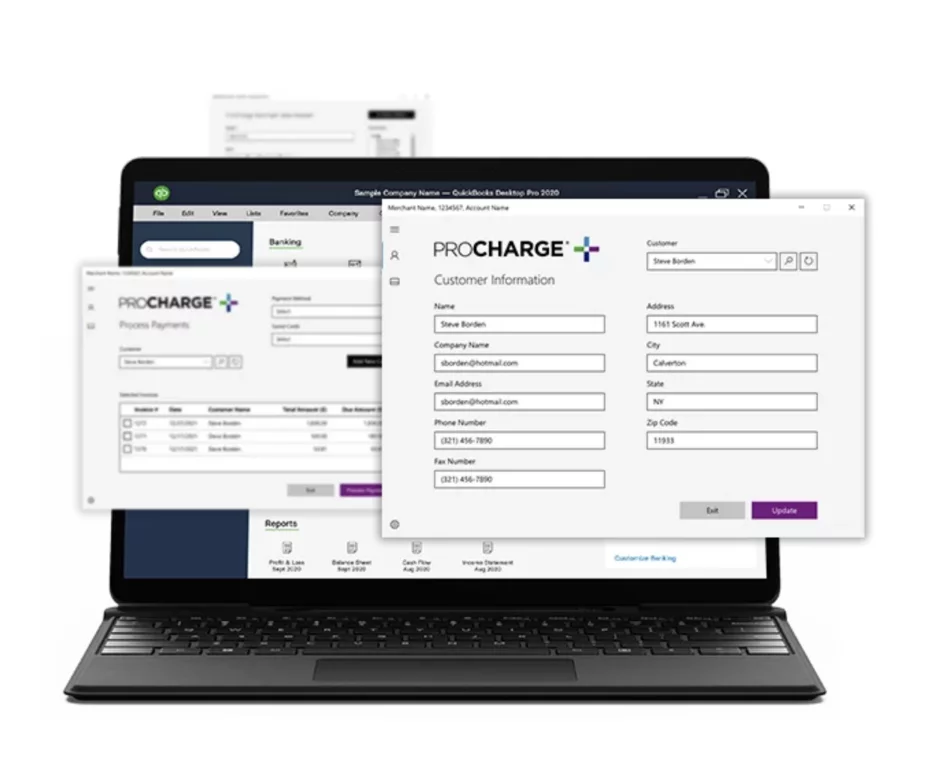
Works seamlessly with your existing accounting software. No training required. Same day or next day funding.
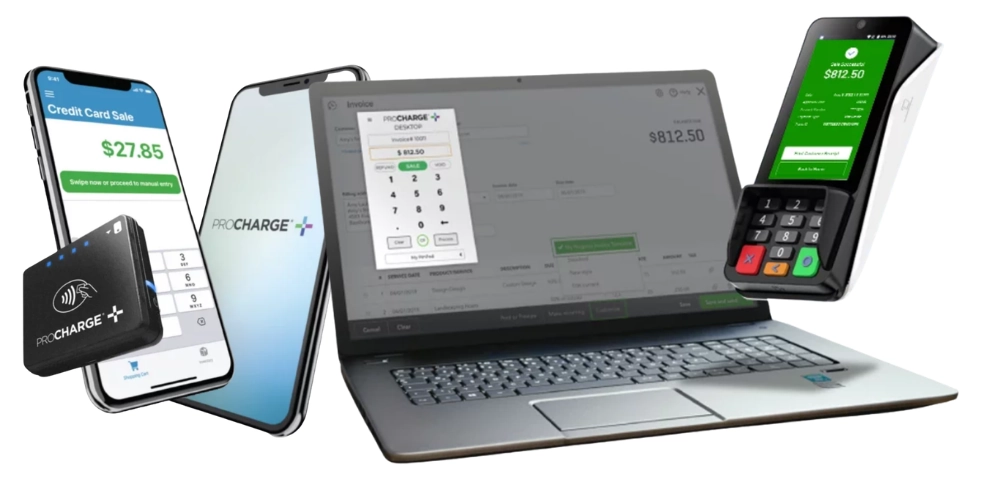
Part of the complete ProCharge platform - connect your office, mobile staff, and online invoicing in real-time
Chat with Jenny - Get Started TodayI'm ready and just want to speak to a live agent!
Schedule a Call NowProCharge Desktop isn't just office software - it's part of a fully integrated payment ecosystem that connects your office, mobile staff, online invoicing, and accounting software in real-time. All your payment data syncs automatically across every device and application.
In-Office Payments
Process payments at reception, checkout counters, or any workstation. Perfect for when customers come to you.
Field & Delivery Payments
Your sales team, delivery drivers, and field service techs can accept payments anywhere using their smartphones. All transactions sync instantly to your system.
Online Payments & Invoicing
Send professional invoices with payment links, set up recurring billing, process phone orders, and accept website payments. All from one virtual terminal.
QuickBooks Integration
Every payment from Desktop, Mobile, and Gateway automatically syncs to QuickBooks in real-time. Zero double-entry. Zero reconciliation headaches.
Imagine this: Your receptionist processes a payment on ProCharge Desktop at 9 AM. At 10 AM, your delivery driver accepts a payment on ProCharge Mobile across town. At 2 PM, you send an invoice through ProCharge Gateway that a customer pays online at 4 PM. All three transactions automatically appear in your QuickBooks, your daily reports, and your bank deposit - in real-time. No manual entry. No batch uploads. No reconciliation nightmares. That's the power of the ProCharge platform.
You don't have to implement everything at once. Start with ProCharge Desktop for your office, then add Mobile when you hire delivery drivers, add Gateway when you want to start invoicing, add Plugin when you want QuickBooks integration. They all work together seamlessly, and you only pay for what you use.
Chat with Jenny About Your Payment NeedsIntegrates seamlessly with QuickBooks and your existing accounting or practice management software. No need to change your workflow.
So simple, your staff will be processing payments in minutes. Just two fields to fill out - that's it!
Accept EMV chip cards, NFC contactless payments including Apple Pay and Google Pay. Customers keep their cards in hand throughout the transaction.
Save receipts electronically and search instantly. No more filing cabinets or hunting through paper records for hours.
Get your money fast with same day or next day deposits for all major bank cards. No more waiting days for your funds.
U.S.-based technical support available around the clock. Real people ready to help whenever you need it.
Desktop, Mobile, Gateway, and QuickBooks all sync automatically. Process a payment anywhere, see it everywhere instantly.
Process payments at multiple workstations throughout your office. No more sending everyone to a single terminal and creating bottlenecks.
Customer-facing terminal means you never handle their cards. More secure for them, more hygienic for everyone, especially important in medical offices.
Competitive rates and transparent pricing mean substantial savings on credit card processing compared to many traditional processors.
Desktop application installs in minutes with zero downtime. Start accepting payments immediately.
Fully compliant with payment card industry security standards. Your data and your customers' data stay protected.
Multiple staff members can use ProCharge Desktop from different workstations simultaneously. Perfect for busy offices.
Download and install the ProCharge Desktop application on your Windows or Mac computer in minutes.
Set up the customer-facing countertop payment terminal. Simple plug-and-play setup.
Type the payment amount in the desktop application alongside your accounting software.
Amount appears on the customer-facing terminal. They insert, tap, or swipe their card to complete the transaction.
ProCharge Desktop is part of the ProCharge ecosystem - a fully integrated payment platform where all your payment tools work together seamlessly. Process payments in your office, on the go, and online, with everything syncing automatically in real-time.
In-office payment processing that works with your existing software. Perfect for reception desks, service counters, and professional offices.
Turn your smartphone or tablet into a mobile POS. Perfect for field service technicians, delivery drivers, and mobile sales teams.
Web-based virtual terminal for processing payments from anywhere, sending invoices, setting up recurring billing, and managing everything centrally.
Direct integration with QuickBooks that syncs all your payment data automatically. Eliminate double entry and streamline your accounting.
All ProCharge applications automatically sync transaction data in real-time. Process a payment on your phone in the field? It instantly appears in your desktop app, Gateway, and QuickBooks. No manual entry. No delays. No confusion.
Begin with ProCharge Desktop for your office needs
Add Mobile for field service or Gateway for invoicing when ready
All your payment data automatically stays synchronized
Office: ProCharge Desktop for walk-in payments and phone orders
Field: ProCharge Mobile for technicians to collect payment on-site
Billing: ProCharge Gateway to send invoices and set up recurring maintenance contracts
Accounting: ProCharge Plugin syncs everything to QuickBooks automatically
"All our transactions from the office, field, and online invoices sync automatically. Our accountant loves that everything's already in QuickBooks."
Front Desk: ProCharge Desktop for patient copays and payments
Billing Department: ProCharge Gateway to send patient invoices electronically
Recurring: Set up automatic monthly payments for treatment plans
Accounting: Everything syncs with their practice management software
"Patients can pay at check-in or we can email them an invoice. Either way, we get paid faster and it's all tracked digitally."
Counter Sales: Multiple ProCharge Desktop stations for fast checkout
Delivery Drivers: ProCharge Mobile to collect COD payments on delivery
Net-30 Accounts: ProCharge Gateway to send invoices and accept online payments
Reports: Real-time dashboard shows all sales across all channels
"We can process payments at multiple counters, our delivery drivers can collect on the spot, and all the data is instantly available. Game changer."
"ProCharge Desktop is saving us time and we're able to get more customers paid up and on their way quickly. There was virtually no training needed!"
"For business owners who value simplicity, I think ProCharge Desktop is the right product. That's what we love about it—the solution is simple and seamless!"
"We can search through our digital files instantly and get customers what they need quickly. Tracking every receipt digitally has been a huge help. If a customer calls requesting a copy of their receipt, we email it to them while we're still on the phone."
ProCharge Desktop is a payment processing solution designed specifically for professional offices. It consists of a desktop application that works alongside your accounting software and a customer-facing countertop payment terminal. You enter payment amounts on your computer, and customers complete the transaction on the terminal using their preferred payment method.
ProCharge Desktop is ideal for medical offices, dental practices, professional service firms, parts suppliers, service centers, metal supply companies, and any business that already uses accounting or practice management software and wants a simple, no-frills payment solution without switching to a full POS system.
Yes! ProCharge Desktop integrates seamlessly with QuickBooks Desktop. It also works with most other accounting and practice management software, or can operate as a standalone solution.
Installation typically takes just a few minutes. The desktop application downloads quickly, and the countertop terminal is plug-and-play. Most businesses are processing payments within 15-20 minutes of starting setup, with zero downtime.
Virtually no training is required. The desktop application has only two fields to fill in. Your staff simply enters the payment amount on the computer (just like they already do with your accounting software), and the customer handles the rest on the terminal. Customers have reported their teams were up and running immediately.
Absolutely! ProCharge Desktop supports all modern payment methods including EMV chip cards, NFC contactless payments, Apple Pay, Google Pay, and traditional magnetic stripe cards. Customers have complete flexibility in how they pay.
Yes, and that's one of the biggest advantages. The payment terminal faces the customer, which means your staff never handles customer credit cards. This increases security, improves hygiene (especially important in medical settings), and gives customers complete control over their transaction.
Yes! ProCharge Desktop supports multiple workstations and terminals throughout your office. This eliminates the bottleneck of having everyone line up at a single payment station. Different staff members can process payments simultaneously from their own computers.
All receipts are automatically saved electronically in the system. You can search and retrieve any receipt instantly by customer name, date, amount, or invoice number. You can email or text receipts to customers, and you'll never need to dig through filing cabinets again. Customers report saving hours compared to their old paper-based systems.
ProCharge Desktop offers same day or next day funding for all major bank cards. Your deposits are processed quickly so your money is available when you need it.
Quality Card Services provides 24/7 technical support with real U.S.-based support staff. You can also chat with Jenny, our AI payments specialist, anytime for instant answers. Plus, most customers report they haven't needed to call technical support at all because the system is so reliable and straightforward.
Yes. ProCharge Desktop is PCI DSS certified, meeting the highest payment card industry security standards. All sensitive cardholder data is encrypted and stored securely, and because the terminal is customer-facing, your staff never handles card information.
Yes, processing refunds is simple and straightforward through the ProCharge Desktop application. Just like regular transactions, refunds are processed quickly and reflected in your reports.
Unlike many payment processors, ProCharge Desktop has no additional monthly fees beyond standard processing costs. You get competitive processing rates, next day funding, and 24/7 support with transparent, straightforward pricing. Contact us for a custom quote based on your business volume.
Yes! ProCharge Desktop supports integrated gift card processing at no additional cost. You can issue, redeem, and track gift cards right through the system. Gift card transactions sync across the entire ProCharge platform, so gift cards sold on Desktop can be redeemed on Mobile or Gateway, and vice versa.
Quality Card Services provides the customer-facing countertop payment terminal as part of your ProCharge Desktop setup. The terminal is modern, reliable, and supports all payment types. We'll help you choose the right terminal for your specific needs.
ProCharge Desktop is intentionally simpler than a full POS system. It's designed for businesses that already have accounting software they love and just need a straightforward way to accept payments. You don't get inventory management, complex reporting, or table management - but you do get incredibly fast setup, zero training requirements, and seamless integration with your existing workflow. If you need a full POS system, ask us about Clover or Exatouch instead.
ProCharge Desktop is designed for in-office use. However, it integrates with the broader ProCharge ecosystem, which includes ProCharge Mobile for on-the-go payments and ProCharge Gateway for online payments. All your payment data syncs in real-time across the platform.
ProCharge Desktop is part of a fully integrated platform. Every payment processed on Desktop automatically syncs in real-time with ProCharge Gateway (your virtual terminal and reporting hub). If you add ProCharge Mobile for your field staff or delivery drivers, those transactions sync too. If you use the ProCharge Plugin with QuickBooks, all payments from Desktop, Mobile, and Gateway flow directly into your accounting software automatically. You get one unified view of all payments across your entire business, no matter where they happen.
Absolutely! While ProCharge Desktop handles in-office payments, you can also use ProCharge Gateway (included with your account) to send professional invoices with payment links via email. Customers can pay online, and those payments sync automatically with your Desktop transactions. Perfect for billing customers remotely, setting up recurring payments, or giving customers the option to pay later.
That's where ProCharge Mobile comes in. You can equip your mobile staff with the ProCharge Mobile app on their smartphones and a card reader (included with your account). They can accept payments in the field, and every transaction automatically syncs with your ProCharge Desktop and Gateway in real-time. You'll see their sales instantly in your reports, and if you use QuickBooks, those payments flow right into your accounting too.
Not at all! You can start with just ProCharge Desktop for your office and add other components as your business needs grow. Want to add mobile payments later? No problem. Need invoicing capability down the road? Easy to add. The beauty of the platform is that everything works together seamlessly when you're ready, but you only pay for what you use. Many businesses start with Desktop and Gateway, then expand from there.
All ProCharge applications connect to your ProCharge Gateway account, which acts as the central hub. When anyone processes a payment on Desktop, Mobile, or Gateway, that transaction is instantly recorded across the entire platform. You don't have to do anything - it's automatic. This means your sales reports are always current, your QuickBooks (if connected) is always up-to-date, and you always know exactly what's happening in your business in real-time, regardless of where payments are being processed.
Yes! ProCharge Desktop provides transaction history, batch reports, and the ability to search and filter past transactions. For more detailed reporting and analytics, your data also syncs with ProCharge Gateway for comprehensive insights.
Absolutely! That's one of the biggest advantages. ProCharge Desktop is part of the complete ProCharge platform. If you add ProCharge Mobile for field service, ProCharge Gateway for online invoicing, or ProCharge Plugin for QuickBooks integration, all your payment data syncs automatically in real-time. You can start with just Desktop and add other components whenever your business needs grow - everything works together seamlessly.
Yes! By adding ProCharge Gateway (which is web-based and free to use with your account), you can send electronic invoices, set up recurring billing, and accept online payments - all while keeping your in-office ProCharge Desktop for counter transactions. All payment data syncs automatically across both systems in real-time.
Perfect use case for the full ProCharge platform! You can use ProCharge Desktop in your office for counter sales and add ProCharge Mobile for your field technicians or delivery drivers. They can process payments on their smartphones or tablets, and all transactions automatically sync with your desktop system, Gateway, and accounting software. Many service companies use this exact setup - office staff and field staff all connected on one platform.
You can absolutely use just ProCharge Desktop if that's all you need. There's no requirement to use the other components. However, one of the biggest advantages of ProCharge is that you can start simple and grow as your needs change. Need to add mobile payments next year? Just add ProCharge Mobile and everything syncs automatically. Want to start sending electronic invoices? Add Gateway. The platform grows with your business without switching processors or learning new systems.
We're a veteran-owned merchant services company with over 25 years of experience serving businesses in San Antonio and nationwide. We focus on three core values: Quality Service, Quality Prices, and Quality Products. Unlike big processors, you'll work directly with our team, and you'll have access to Jenny, our AI payments specialist, 24/7. We offer zero-fee processing programs and genuinely care about helping your business succeed.
Chat with Jenny right now for instant answers to your questions, or call us at (210) 944-4331. We'll discuss your business needs, explain pricing, and can have you up and running within days. There's zero downtime during setup, so you never have to stop accepting payments.
Chat with Jenny, our AI payments specialist, for instant answers and personalized recommendations.
Chat with Jenny NowOr call us at (210) 944-4331
Delivering quality merchant services with integrity, transparency, and dedication to your business success.
Veteran Owned & OperatED | Proudly based in San Antonio, Texas